TiviMate is an IPTV media player that lets you watch content from playlists you add yourself. It is designed for Android TV devices, but it does not supply TV channels, movies, or an IPTV subscription.
The distinction is important: TiviMate provides the application you use to browse and play content, while your separate content source supplies the streams. Paying for TiviMate Premium unlocks additional application features—not a package of channels.
This guide explains what the app does, who it suits, and what to check before installing it or purchasing an upgrade.
What Is the TiviMate App?
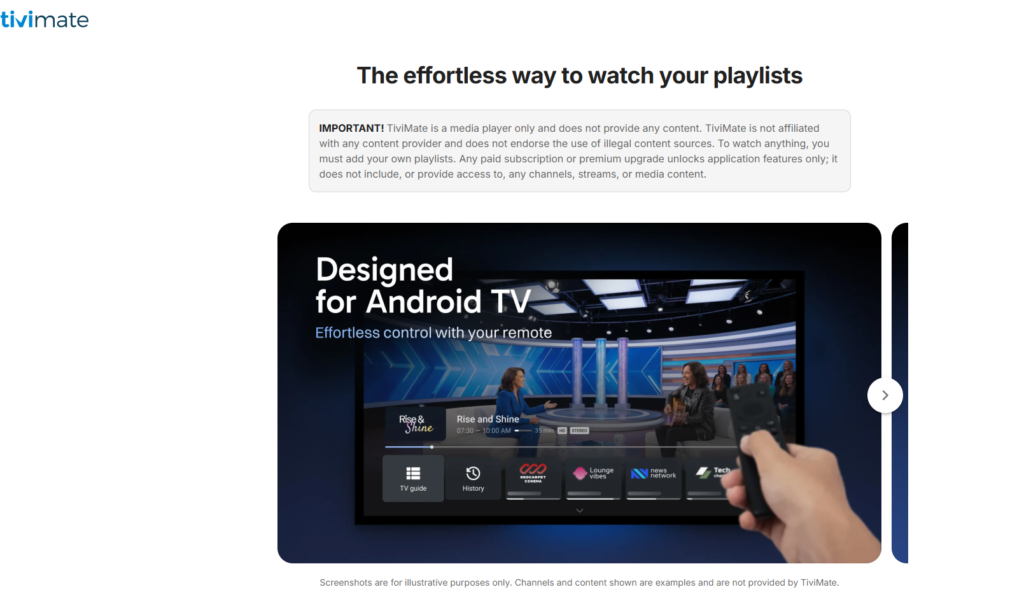
The TiviMate app is a television-focused player for accessing and organizing your own IPTV playlists. It brings your content into an interface where you can browse channels, save favorites, and use supported playback features.
If you are asking “what is TiviMate IPTV player?” or “what is TiviMate used for?”, the answer is straightforward: it is the software used to watch your content, not the provider selling you access to that content.
| Part of your setup | Its role |
|---|---|
| TiviMate app | Browses and plays the content you add |
| Playlist or content source | Supplies the channels and media you can access |
| TiviMate Premium | Unlocks additional application functionality |
| Your television device | Runs the player and displays the content |
You may see the name written as “Tivi Mate” or misspelled as “Tvimate.” The correct name of the application discussed here is TiviMate. Similar-looking names should not automatically be treated as the same product.
What Does TiviMate Do?
TiviMate helps you navigate playlists, find channels and shows, and manage how you watch them. Its advertised capabilities include multiple playlists, favorite channels, search, multiview, recording, catch-up, parental controls, and personalization.
The availability of a feature in the app does not mean every playlist or content source supports it. Check your application tier, device, and content source before relying on a particular function.
Organize playlists and favorite channels
Playlist management helps you keep your viewing sources organized, while favorites give you quicker access to the channels you watch regularly.
If you are unfamiliar with playlist terminology, read our explanation of what an M3U playlist is. Understanding the difference between a playlist and a player makes the setup process easier.
Find channels and shows
Search functionality helps you locate channels and shows within the content available through your setup. It does not add programs your content source does not provide.
If you are researching content availability rather than player features, our guide to whether IPTV includes all TV channels addresses that separate question.
Use additional viewing features
TiviMate advertises multiview, recording, and catch-up. These serve different purposes:
- Multiview displays different channels on the same screen.
- Recording saves a program for later viewing.
- Catch-up provides access to past broadcasts when available through your setup.
Before purchasing an upgrade for one of these features, confirm its current requirements and whether your content source supports the intended use.
Does TiviMate Include Channels or an IPTV Subscription?
No. TiviMate does not include a channel package or an IPTV subscription. You need to add your own playlist or compatible content source before you can watch anything.
Installing the app, paying for Premium, and obtaining content access are separate actions. Confusing them can lead to buying an upgrade without having anything to play.
Before paying, check what the offer actually covers:
| Type of purchase | What to confirm |
|---|---|
| Application upgrade | Which player features it unlocks |
| Content subscription | What viewing access it supplies |
| Device purchase | Whether it includes anything beyond the hardware |
A TiviMate Premium purchase should not be presented as an official subscription to television channels.
To review service information and subscription options, visit iptv canada. Check what the service provides separately from any TiviMate Premium purchase.
Which Devices Is TiviMate Designed For?
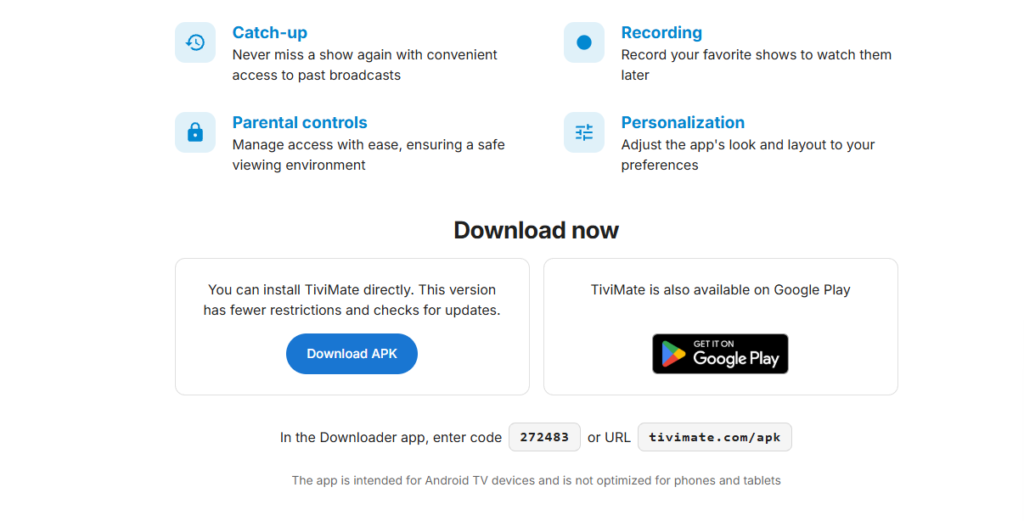
TiviMate is designed for Android TV devices. It is not optimized for phones and tablets, so you should not assume it delivers the same experience on every Android device.
Check the official application’s availability for your hardware before purchasing an upgrade. Also, do not assume an app with a similar name on another platform is the same TiviMate product.
If you use NVIDIA Shield, our IPTV on NVIDIA Shield guide covers the device-specific setup context. The device setup and your choice of content source remain separate parts of the process.
If you are preparing an external box for your television, our guide to connecting an IPTV box to a TV covers the hardware connections. Connecting the box does not replace installing and configuring the player.
Is TiviMate Free?
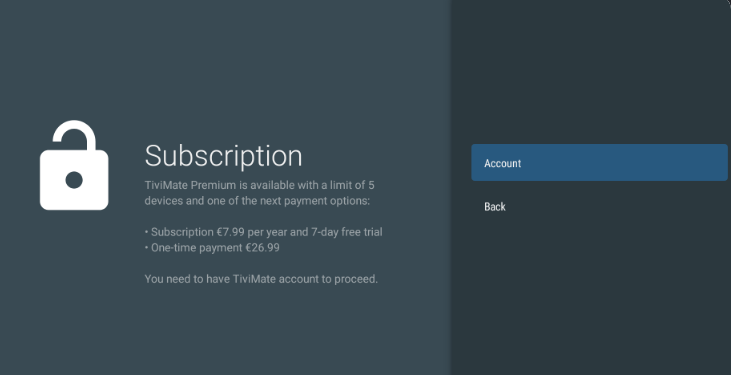
The question “is TiviMate free?” needs to distinguish application access from paid features and content subscriptions. Do not assume every advertised function is available without an upgrade.
If you searched for “is TiviMate IPTV player free?”, check the current options shown in the official app or purchase process. The important point is that paying for Premium does not supply channels.
Before upgrading, review:
- Which features are available without payment.
- Which features require Premium.
- The current price and currency.
- The purchase duration and renewal terms.
- Any device or account restrictions.
Check prices and allowances against the current offer rather than relying on figures copied from an older guide.
Is TiviMate Good?
TiviMate may be a good fit if you want a TV-focused player for your own playlists and value features such as favorites, search, playlist organization, and interface customization.
Whether it suits you depends on your device and viewing habits. A feature-rich application is not automatically the right choice if you only need basic playback or use a device outside its intended platform.
| Your priority | What to evaluate |
|---|---|
| Simple channel navigation | Favorites, search, and the browsing interface |
| Multiple viewing sources | Playlist management |
| A television-focused experience | Compatibility with your device |
| Additional viewing controls | Current feature availability and upgrade requirements |
| Channels included with the app | TiviMate does not supply them |
If you are wondering “is TiviMate any good?”, start with those practical checks rather than relying on a broad recommendation.
Is TiviMate the Best IPTV Player?
TiviMate offers a range of features, but calling it the best IPTV player for everyone would overlook differences in devices, budgets, and viewing needs.
When asking “is TiviMate the best?”, compare the functions that matter to you. These might include playlist management, channel navigation, recording requirements, or interface customization.
Also compare the right category of products. An IPTV player is an application; an IPTV provider supplies content access. A player cannot guarantee the quality, availability, or authorization of a separate content source.
If your question concerns services rather than applications, our IPTV services comparison for Canada covers a different part of the decision. Keep provider selection separate from choosing your player.
Is TiviMate Premium Worth It?
TiviMate Premium is worth considering when its currently advertised paid features solve a specific need in your setup. It is not worth buying under the assumption it will automatically provide more channels.
Before upgrading, identify the feature you need and confirm it is included in the current Premium offer. Then check the purchase terms and any restrictions affecting your device.
For example, if you want a particular viewing or management feature, verify that it works as expected with your setup before committing. If your needs are limited to straightforward playback, evaluate the available functionality first.
Base the decision on the player features you will use—not on an expectation of receiving a content subscription.
Is TiviMate Legit?
TiviMate has an official website and a clearly stated role as a media player. It is separate from the services or playlists users add to it.
However, asking “is TiviMate legit?” can mean two different things:
- Is the application you are downloading the authentic product?
- Is the content source you are using authorized to distribute its streams?
Those questions require separate checks. An authentic player does not establish that every playlist used with it is legitimate.
Be cautious if a seller claims the official TiviMate Premium upgrade includes channels. Premium concerns application features, not content access.
Is TiviMate Safe to Use?
No guide can guarantee that every download using the TiviMate name is safe. Use the installation routes identified by the official developer rather than assuming an unrelated download page is trustworthy.
Check the product identity before installing, and avoid modified downloads claiming to unlock paid features unofficially.
Application authenticity, account security, and content authorization are separate issues. Using the genuine player does not verify the rights behind a third-party playlist.
If you are also considering a VPN, our guide to whether you need a VPN for IPTV addresses that separate question. Do not treat a privacy tool as proof that a download or content source is trustworthy.
What Do You Need to Start Using TiviMate?
You need a suitable device, the genuine application, and your own compatible playlist or content source.
Prepare your setup in this order:
- Confirm the application is suitable for your device.
- Install it through an official route.
- Obtain the required playlist or access details from your authorized source.
- Follow the relevant setup instructions.
- Test playback before deciding whether you need Premium.
For the wider preparation process, follow our IPTV setup guide. Keep your account details private and do not share playlist credentials publicly.
Can TiviMate Record IPTV?
Recording is one of TiviMate’s advertised features, but verify the requirements for your application tier, device, storage, and content source before relying on it.
Do not assume every installation can record every program. Check the current instructions and test the function before using it for something important.
Recording and catch-up are also different. Recording saves a program for later viewing, while catch-up accesses past broadcasts made available through the content source.
Does TiviMate Sync Across Devices?
Do not assume using TiviMate on more than one device automatically synchronizes playlists, favorites, settings, or recordings.
If cross-device synchronization matters to you, check the current application documentation for the exact type of synchronization you need. Account access, application activation, settings transfer, and continuous synchronization are different functions.
Verify the specific capability before purchasing an upgrade for a multi-device setup.
Who Owns TiviMate?
To identify the current developer or publisher, check the information attached to the official application and its purchase process.
Do not use the name of an IPTV reseller or a similarly branded website as proof of ownership. A company selling content for use with TiviMate is not necessarily connected to the application’s developer.
Confirm the publisher’s identity through the official product information before downloading or paying.
Is TiviMate Down Today in Canada?
A playback problem alone does not establish that TiviMate is experiencing a current issue in Canada.
Because the player and content source are separate, investigate the application, your device, and your service rather than treating every interruption as a TiviMate outage.
Before performing a factory reset:
- Note the exact error message.
- Check whether the application opens normally.
- Check whether the issue affects one stream or all available content.
- Confirm your content account is active.
- Check for current notices from the relevant developer or provider.
For a box-specific issue, consult our IPTV box reset guide before taking steps that could remove saved settings. Restarting and factory resetting are different procedures.
Other IPTV Player Guides
If you are researching applications beyond TiviMate, these existing guides cover separate products and workflows:
- Xtream IPTV player guide — a separate guide to Xtream-related player features and setup.
- Kodi IPTV setup guide — guidance for an IPTV setup using Kodi.
Use the instructions for the application you actually have installed. Do not assume menu options, paid features, or setup steps transfer directly between players.
Frequently Asked Questions About TiviMate
Is TiviMate an IPTV provider?
No. TiviMate is a player used to access content you add yourself. It does not supply an IPTV subscription.
Does TiviMate Premium include channels?
No. Premium unlocks application functionality, not channels or streams.
Is Tivi Mate the same as TiviMate?
“Tivi Mate” may be used as a spaced version of the name, but the correct spelling is TiviMate. Verify the actual app rather than relying on similar wording.
What Is Tvimate?
“Tvimate” may be a misspelling of TiviMate. If you mean the IPTV player discussed in this guide, it is the application used to browse and play your own playlists.
What Is TV Mate or Tvmate?
These names are ambiguous and should not automatically be treated as TiviMate. Check the developer, application listing, and product identity before installing or purchasing anything.
What Is Tivi?
“Tivi” alone does not identify a specific application. Confirm the complete product name before following instructions intended for TiviMate.
Does TiviMate Have Parental Controls?
Parental controls are included in its advertised feature set. Check the current settings and application-tier requirements for your installation.
Can You Use TiviMate Without a Playlist?
You can install the player, but it does not supply content to watch. You need to add your own compatible content source.